


Airport Design Challenge (7-12): Choose Your Airport
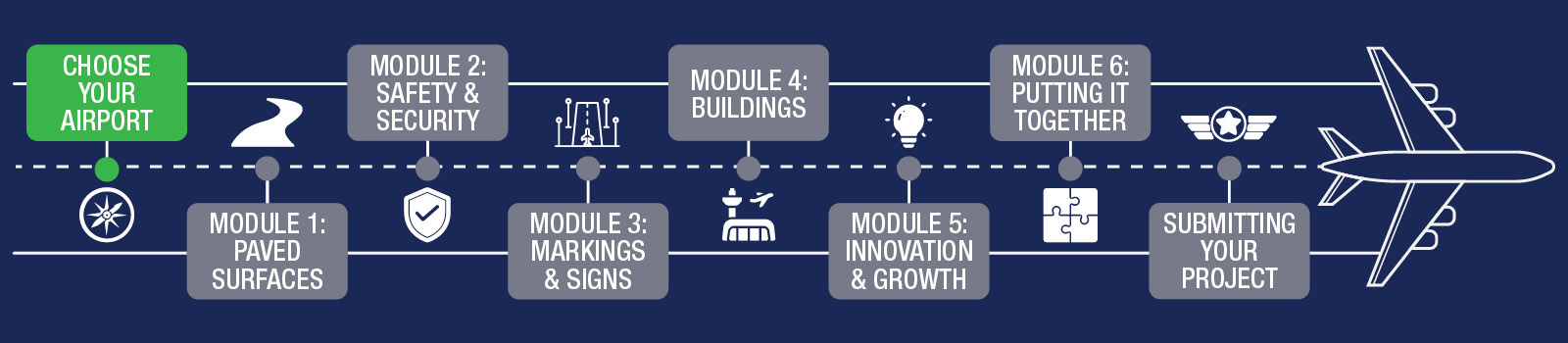
It’s time to start thinking about what type of airport you’d like to build. Review the information on this page, research your options, and select the airport you will model in Minecraft.
How Are Airports Categorized?
The Airport Design Challenge has different divisions or categories. All students and teams in grades K-6 will be judged together. Students and teams in grades 7-12 will be divided into two categories: primary and non-primary airports. To learn more about different types of airports, see the table below and research your local airport to see how it’s classified!
| Grades K-6 | Grades 7-12 |
|---|---|
| All Airports |
|
There are approximately 14,400 private-use (closed to the public) and 5,000 public-use (open to the public) airports, heliports, and seaplane bases. Approximately 3,300 of these public-use facilities are included in the National Plan of Integrated Airport Systems (NPIAS).
For this challenge, you will choose a NPIAS airport to develop in Minecraft.
| Primary Airports | Non-Primary Airports | ||
|---|---|---|---|
| Commercial Service | Publicly owned airports with at least 2,500 annual enplanements and scheduled air carrier service. Primary airports are a commercial service airport with more than 10,000 annual enplanements. | Nonprimary Commercial Service, Non-hub | Also referred to as non-hub nonprimary, these airports have scheduled passenger service and between 2,500 and 10,000 annual enplanements. |
| Large Hub | Receives 1 percent or more of the annual U.S. commercial enplanements. | Reliever | An airport designated by the Secretary of Transportation to relieve congestion at a commercial service airport and to provide more general aviation access to the overall community |
| Medium Hub | Receives 0.05 to 0.25 percent of the annual U.S. commercial enplanements. | General Aviation | A public-use airport that does not have scheduled service or has scheduled service with less than 2,500 passenger boardings each year. |
| Small Hub | Receives 0.25 to 1.0 percent of the annual U.S. commercial enplanements. | ||
| Non-hub | Receives less than 0.05 percent but more than 10,000 of the annual U.S. commercial enplanements. | ||
Look up the airports near you! What size/classification are they? Consider how each airport fits into the national airspace system and how challenging it may be to build. Then, make your final selection and get ready to take off!
Research & Choose Your Airport
This competition asks students to research a local airport in their State/Community which they will reproduce in the virtual world of Minecraft. To find airports near you, please visit the AirportIQ 5010 website.
Conduct your search by inputting your city and then from the results list, you may download the Airport Master Record (Form 5010) to learn all about the size and services available at each airport. As a team, choose which airport you will create.
NOTE: Large commercial airports are very big and very complex. Previous students have had much better luck at completing the challenge when they chose smaller, regional or local airports.
Step 1
Visit https://www.airportiq5010.com/5010Web/ then type in the name of the city where you live.
NOTE – If searching your city does not provide any results, try searching using the nearest major city.
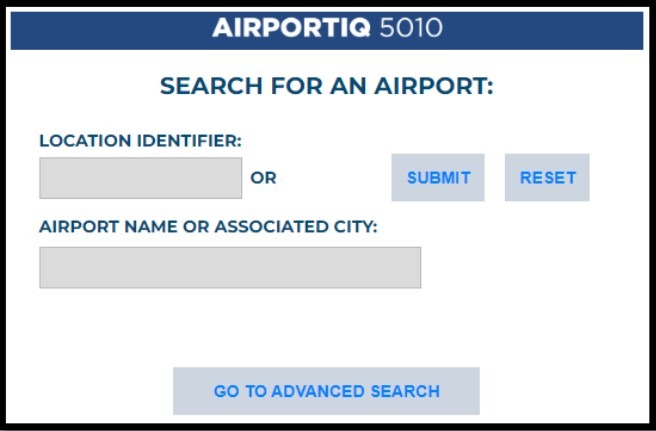
Step 2
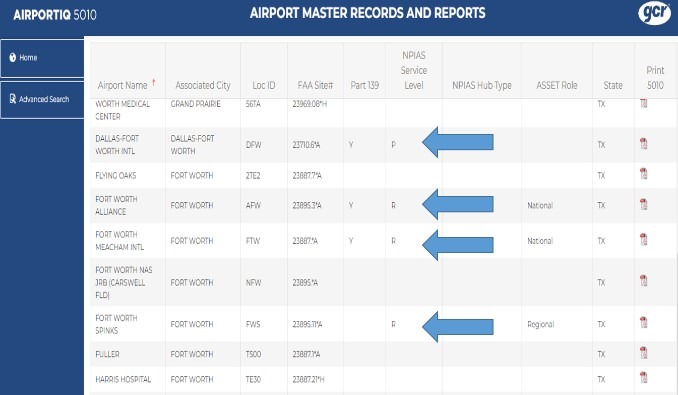
Look for airports that show a letter in the NPIAS Service Level column. Choose one of these airports to build in Minecraft.
WARNING – Using non-NPIAS airports will substantially limit your access to important airport information. Please only choose NPIAS airports.
Step 3
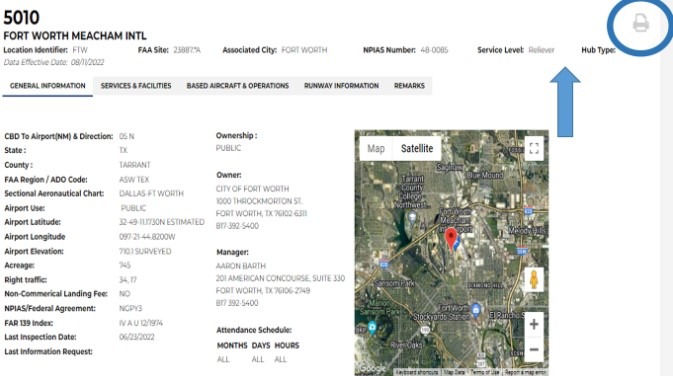
Click the name of the airport to open the Airport Master Record. This record will show you a satellite view of the airport, give you important contact information for the airport manager, and more! The 5010 Form will be very helpful to you throughout the challenge.
On this screen, you can clearly identify the NPIAS service level and Hub Type of your airport.
HINT – After opening the airport record, look for the printer icon to get a downloaded and printable version of the 5010!
Watch this video for help choosing your airport.
Have You Seen Your Airport in Person?
(Optional)
Once you have chosen the airport you want to build in Minecraft, we encourage you to take a tour of the actual airport you are recreating. Airport tours are very educational and will provide you with a unique insight into how things operate at a real airport. The tour will also help you better visualize the scale and size of each of the buildings on the field. In many cases, a visit can be arranged by contacting the airport manager in advance.
Here are the steps we recommend you follow to set up an airport tour:
- Select an airport you want to build in Minecraft. We recommend picking one near your home so you can periodically visit it as a reference for your project.
- Contact the airport manager of the airport and schedule a visit. How do you do that?
- Option 1: Go to www.airnav.com and enter the airport name. You will be taken to a web page that lists a variety of information regarding the airport but about halfway down the page you will see the current airport manager’s name and their contact phone number.
- Option 2: Do a web search using the airport name and see if they have a web page. If so, look at the contact information for the airport. The airport manager is usually one of the first people listed.
- Option 3: Stop by the airport and talk to the airport manager in person. This may be the best option if the airport is small and has a limited staff.
Getting the most out of your tour!
Here are some tips to make your airport tour as fun and productive as possible:
- Stay alert. Airports are active environments with moving aircraft and vehicles. Always remain aware of your surroundings and stay with your tour group.
- Take pictures of everything. As you build your Minecraft airport, these pictures will be helpful in making your airport as realistic as possible.
- Ask lots of questions. Airport managers love showing off their airports and they are a wealth of information about all aspects of what is going on at their field.
- Preplan places you would like to see. This will help the airport manager know what is most interesting to you and allow them time to obtain special permission to bring visitors to the site. Note- there are some areas of an airport that cannot be visited by non-airport personnel but in most cases the airport manager can take you to the outside of the facility and explain what is going on there.
- Have fun. You will be amazed at all the different airplanes and buildings you will see, even at a small airport.
Ready to move on? Up next is Module 1 – Paved Surfaces!
You’ve earned your first set of wings for completing Orientation! Keep going!