


Module 3: Airport Lighting, Markings & Signs
Grades 7-12
Adding airport lighting, markings, and signs in Module 3 requires close attention to detail. These elements are what truly make your airport begin to look and function like a real airport. Take your time and focus on accuracy and consistency. We recommend spending about one week on this module.
To get an overview of airport lighting, markings, and signs — and what to expect during Module 3 — watch the short overview video below.
Before you begin, download  the Lighting, Markings & Signs Workbook. It includes the Module 3 quiz and serves as a helpful reference throughout this module.
By the end of this module, you will complete:
- Know your Airport Lighting, Markings & Signs worksheet
- Airport Operations Staff activity
- Airport Layout Plan (ALP)- Part 3
- Module 3 Quiz (can be found in the Lighting, Markings & Signs Workbook)
- Adding your lighting, markings, and signs to your airport in Minecraft!
You’re halfway there!
You are now halfway through the Airport Design Challenge, and your airport should be taking shape. At this point, all paved surfaces and perimeter areas should be complete so you can begin adding lighting, pavement markings, and signs.
By now, you should have established your runways, taxiways, and other paved surfaces, and cleared your airport perimeter of obstructions and hazards. Next, you will focus on the details that allow pilots and ground vehicles to move safely and efficiently around the airport.
Lighting, pavement markings, and signs provide critical guidance for safe navigation. As you explore what elements exist at your airport, you will recreate each of them in your model. This is also a good opportunity to learn about navigation aids and how they support airport operations.
Learning Objectives:
By the end of this module, you will be able to:
- Explain the functions of airport lighting
- Identify what different light colors indicate on an airport
- Determine whether your airport has a rotating beacon
- Identify required signs and markings and explain their purpose
Airport Development Tasks:
- Begin with daytime operations and add runway markings and signs.
- Identify what types of airport lighting exist at your airport and recreate them in Minecraft. Consider runway and taxiway lights, beacons, instrument landing systems, and other lighting systems.
As you build, refer to the information on this page and in the Lighting, Markings & Signs Workbook.
An airport at night may look like a collection of colorful lights, but each light serves a specific purpose. It is important that the correct type and color of light are used for each function.
As you research your airport, see how many of the following lighting systems you can identify:
- Pilot-controlled lighting
- Rotating beacons
- Approach lighting systems (ALS)
- Runway end identifier lights (REILs)
- VASI and PAPI lights
- Runway lighting
- Taxiway lighting
To prepare for building, download and complete the Know Your Airport Lighting worksheet. Match each type of lighting with its correct description.
Have you ever thought about becoming a pilot who uses airport lighting and markings to navigate safely? Watch this video to learn more about the pilot career path and what the job involves.
FAA's From the Flight Deck video series shows real runway approaches and taxi operations using cockpit-mounted cameras, combined with diagrams and visual graphics that highlight hot spots and other safety-sensitive areas.
Students in the Airport Design Challenge can use these videos to gain a better understanding of how airports look and function from a pilot’s perspective.
The example video below features Daniel K. Inouye International Airport (HNL) in Honolulu, Hawaii.
Airport operations staff are responsible for maintaining lighting, markings, and signs, along with many other airport systems. Some airports have large operations teams, while others operate with smaller staff.
Research how airport operations staff are organized at your airport. How many people are responsible for operations and maintenance? What are their primary responsibilities?
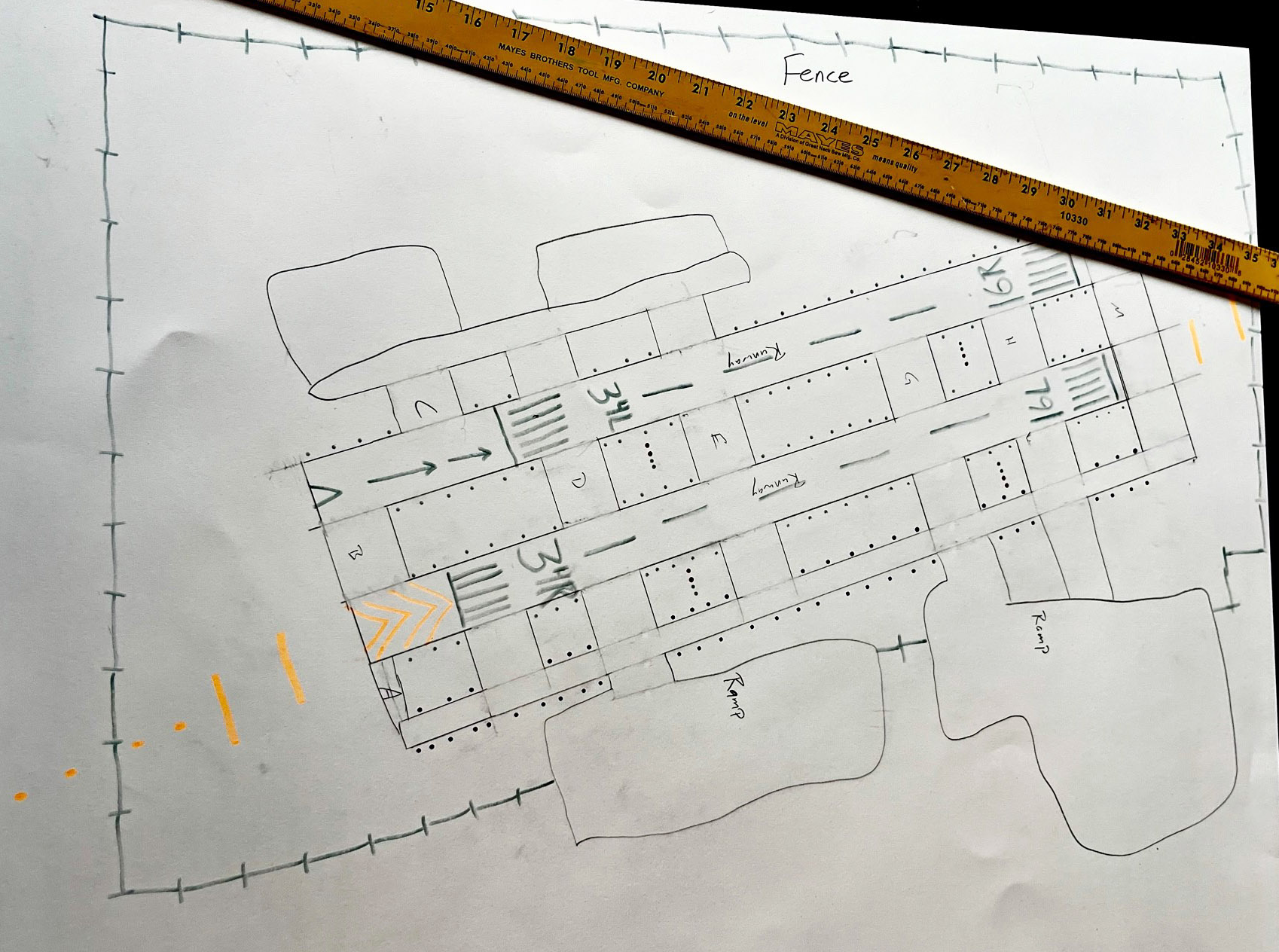
After reviewing the Module 3 content, update your hand-drawn Airport Layout Plan (ALP). Using colored pencils or markers, apply the appropriate markings, signs, and lighting to your airport sketch.
Your ALP should include:
- Runway, taxiway, and other airport lighting
- Surface and runway markings
- Airport signage
When complete, take a clear photo of your drawing and email it to avsed.challenge@faa.gov. Include your name (or team name) and airport in the subject line.
Example:
Here are your wings for completing Module 3! Click the image below to download.

Finished with your Workbook and ready to move on? Next up is Module 4 – Airport Buildings.