


Airport Design Challenge (K-6): Choose Your Airport
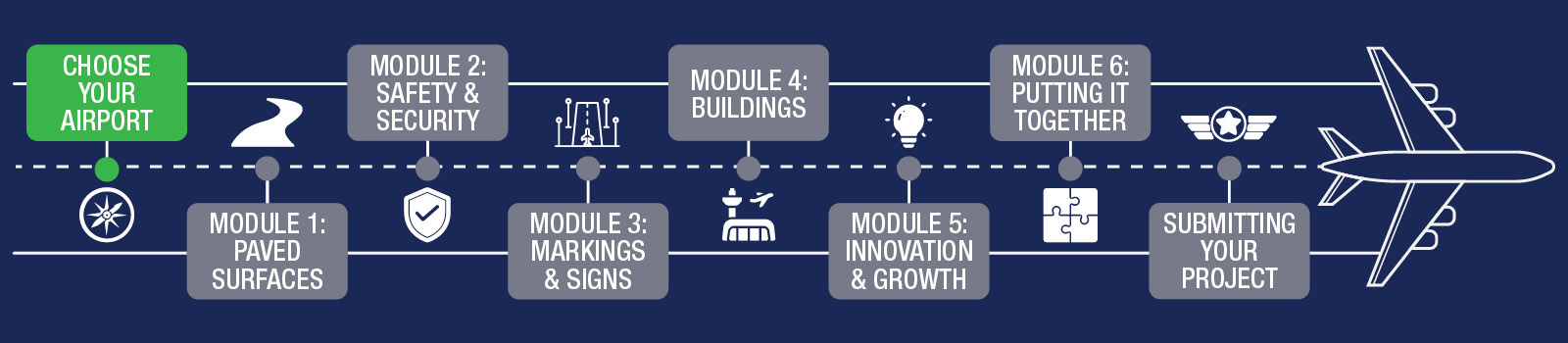
It’s time to think about what kind of airport you want to build. Read this page and pick your airport!
What Are Different Airport Types?
Airport Grading Groups
For students in grades K-6, all airports are in the same group for scoring. Older students have different grading groups based on how big and complicated their airport is. You can see that we divide them in the chart below.
| Grades K-6 | Grades 7 - 12 |
|---|---|
| All Airports | Non-Primary Airports |
| Primary Airports |
There are about 14,400 private (closed to the public) airports and 5,000 public-use (open to the public) airports, heliports, and seaplane bases. About 3,300 of these public-use facilities are included in the National Plan of Integrated Airport Systems (NPIAS).
For this challenge, you will choose an airport from the NPIAS list to build in Minecraft! Even though K-6 airports are all scored together, you should think about the size of your airport and learn about the different types. Bigger airports are harder to build. Be sure to pick one that you think you can do well!
The chart showing different kinds of airports can be complicated to understand. If you have trouble, ask a parent/guardian or teacher to help you learn!
| Primary Airports | Non-Primary Airports | ||
|---|---|---|---|
| Commercial Service | Publicly owned airports with at least 2,500 annual enplanements and scheduled air carrier service. Primary airports are a commercial service airport with more than 10,000 annual enplanements. | Nonprimary Commercial Service, Nonhub | Also referred to as nonhub nonprimary, these airports have scheduled passenger service and between 2,500 and 10,000 annual enplanements. |
| Large Hub | Receives 1 percent or more of the annual U.S. commercial enplanements. | Reliever | An airport designated by the Secretary of Transportation to relieve congestion at a commercial service airport and to provide more general aviation access to the overall community. |
| Medium Hub | Receives 0.25 to 1.0 percent of the annual U.S. commercial enplanements. | General Aviation | A public-use airport that does not have scheduled service or has scheduled service with less than 2,500 passenger boardings each year. |
| Small Hub | Receives 0.05 to 0.25 percent of the annual U.S. commercial enplanements. | Receives 0.05 to 0.25 percent of the annual U.S. commercial enplanements. | |
| Nonhub | Receives less than 0.05 percent but more than 10,000 of the annual U.S. commercial enplanements. | Receives less than 0.05 percent but more than 10,000 of the annual U.S. commercial enplanements. | |
Now look up the airports near you! What size/type are they? Think about how each airport fits into what we call the National Airspace System (NAS) and how hard it may be to build. Then, make your final selection and get ready to take off!
Research & Choose Your Airport
ADC asks students to learn about a local airport in their State/Community which they will then build in the virtual world of Minecraft. To find airports near you, please visit the AirportIQ 5010 website.
Search for airports by typing in your city. Then look at the ones that show up. You can download the Airport Master Record (Form 5010) to learn all about the size and services available at each airport. As a team, choose which airport you will create.
Note: Large airports are very big and harder to build. Past students have done better finishing ADC when they picked smaller, regional or local airports.
Step 1
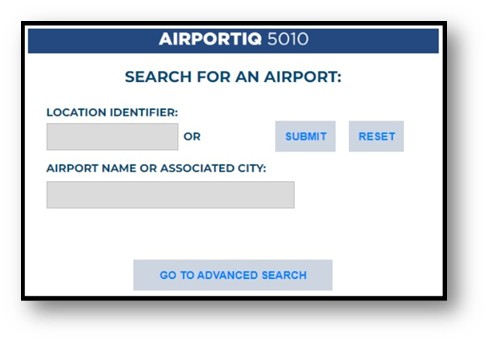
Visit https://www.airportiq5010.com/5010Web/ then type in the name of the city where you live.
Note: If searching your city does not provide any results, try searching using the nearest major city.
Step 2
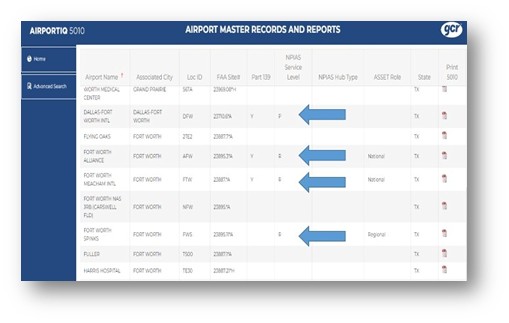
Look for airports that show a letter in the NPIAS Service Level column. Pick one of these airports to build.
Warning: Using non-NPIAS airports will make it a lot harder to find important airport information. Please only choose NPIAS airports.
Step 3
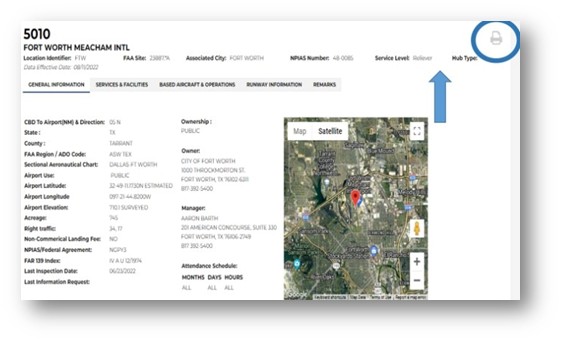
Click the name of the airport to open the Airport Master Record. This will show you a satellite view of the airport, give you important contact information for the airport manager, and more! The 5010 Form will be very helpful to you during the challenge.
On this screen, you can see the NPIAS service level and Hub Type of your airport.
Hint: After opening the airport record, look for the printer icon to get a downloaded and printable version of the 5010!
Watch this video for help choosing your airport.
Ready to Tour Your Airport?
(Optional)
Now that you picked the airport you want to build in Minecraft, it’s time for an adventure — go see the real thing!
Taking a tour of your airport is super fun and will help you see how everything works in real life. You’ll see how big the buildings are, where the planes park, and what makes each airport special.
A visit is easy to plan for. You (and a grown-up) just need to talk to the airport manager and ask for a tour!
Here are the steps we recommend you follow to set up an airport tour:
Pick your airport
Choose one close to your house. That way, you can visit more than once if you want!
Find the airport manager
Here’s how you and a grown-up can do that:
- Option 1: Go to www.airnav.com and type in your airport’s name. Look for the manager’s name and phone number.
- Option 2: Search for your airport online and check its website. Look for “Contact Us” — the manager’s name is usually there.
- Option 3: Visit the airport with a grown-up and ask to talk to the manager in person. This works well for small airports!
Schedule your tour
Call or visit the airport and ask when you can come. Managers love showing kids around!
Tips for a Great Tour!
Here are some tips to make your airport tour as fun and helpful as possible:
- Be safe! Airports have moving airplanes and trucks — stay with your tour group and listen to your guide.
- Take lots of pictures! Pictures help you remember what you saw and will help you build your Minecraft airport.
- Ask questions! Airport managers know all kinds of cool things — ask about airplanes, buildings, and how the airport works.
- Plan what you want to see! Tell the manager what you’re most excited about — like the tower, runways, or big airplanes. Some places can’t be visited inside, but you can still learn about them from outside!
- Have fun! Every airport has something cool to see — even small ones. Look for all the planes, trucks, hangars, and signs that help keep planes safe.
Not Seeing an Airport You Like?
Do you want to dream up an airport that's all yours? You don't have to build a real one, you can design a brand-new airport from your imagination!
Think about where your airport will be. Give your airport a name, build at least one runway and one taxiway, and you must add things like an apron, one building (that could be a terminal or a hangar), and fences or safety boundaries. You'll also need to make sure you have a tower so that the planes can take off and land safely!
There are no limits when you're the designer! Just make sure your airport has safe places to land, park, and take off. Be creative, be safe, and have fun building your very own airport world!
You’ve earned your first set of wings for finishing Orientation! Keep going!

Ready to move on? Up next is Module 1 – Paved Surfaces!