


Airport Design Challenge (K-6): Module 2
Runway Safety Areas, Approaches & Border Fencing
In Module 2, you get a little break after working hard on your roads and runways. Now, you will build a fence all around your airport. Don’t forget to make gates for cars and people to go through! Also, make sure there is nothing blocking the ends of your runways.
We think you should spend about one week on this section.
To get an overview of Airport Safety and what to look forward to during Module 2, watch this short video!
Before you start, download the Safety Areas Workbook (K-6). It includes the Module 2 quiz and helps as you work on this lesson.
By the end of this module, you will complete:
- Airport Security activity
- Airport Layout Plan (ALP) – Part 2
- Module 2 quiz (in the Safety Areas Workbook (K-6))
- Build your safety features in Minecraft
Learning Objectives
By the end of this module, you will be able to:
- Find out what a runway safety area is and why it's important.
- Learn about things that can block runways and how to remove them.
- What kinds of fences are at your airport? Why is it important to keep people out of certain areas?
Airport Development Tasks:
- Make sure your runway safety areas are clear and have lots of space for planes to move safely. Build a fence around your airport. Don't forget to add gates so vehicles can get in and out.
- As you build, use the information on this page and in the Safety Areas Workbook (K-6).
Ready to learn about airports? First, we need to make sure all the roads and paths are done. If you haven't finished your first tasks, do those before starting this part.
In this part, you'll learn about the space around the airport. You'll find out how to keep the runway safe and make sure nothing is in the way when planes land. You'll also build fences and gates to keep animals and people out, so planes can fly safely. Think about where the gates should go and how they work.
Now that you've made the roads, let's make sure the area around the airport is safe for planes. You’re making your airport safer already. Great work!
A runway safety area is a special open space around the runway that helps keep airplanes and people safe. It is like an invisible safety bubble that gives planes extra room if they slide or go off the runway when landing or taking off.
When you build your airport, make sure you leave enough clear space around your runway. No trees, buildings, or cars should be in that area. That way, pilots and passengers stay safe, and the airplanes have plenty of room to stop if they need it.
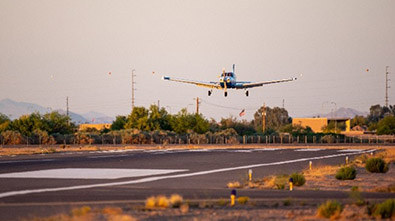
When an airplane is ready to land or take off, it follows a special invisible path in the sky called an approach. This path starts at the end of the runway and goes up and out like a ramp in the air.
When you build your airport in Minecraft, you don't need to build the approach, but you do need to make sure there's nothing in the way. Keep trees, hills, or buildings out of this path so planes can fly safely when they come in to land or go up to the sky.
Watch Technical Operations employees explain the excitement of working for the FAA and why they love their jobs.
FAA's From the Flight Deck video series shows real runway approaches and taxi operations using cockpit-mounted cameras, combined with diagrams and visual graphics that highlight hot spots and other safety-sensitive areas.
Students in the Airport Design Challenge can use these videos to gain a better understanding of how airports look and operate from a pilot’s perspective.
Watch this example video featuring San Antonio International Airport (SAT) in Texas.
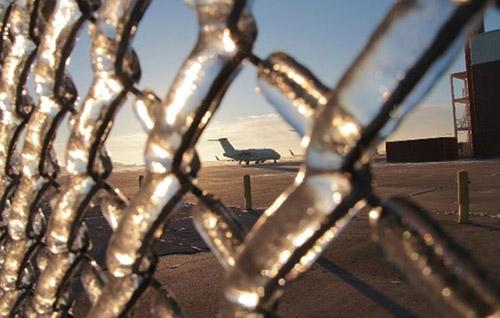
Research your airport and identify how they maintain security of the airfield. Describe who is responsible for security (fences, gates, etc.). Is security one person’s job or is there a team that provides it?
Note: If you are building a commercial service airport, don't confuse airfield security with the Transportation Security Administration (TSA). They are the folks in uniform who check your bags inside the airport terminal. We want you to learn about the airfield and the security around the entire airport.
Write a couple of sentences or a short paragraph explaining how your airport maintains security. Include details about the staff and how they operate.
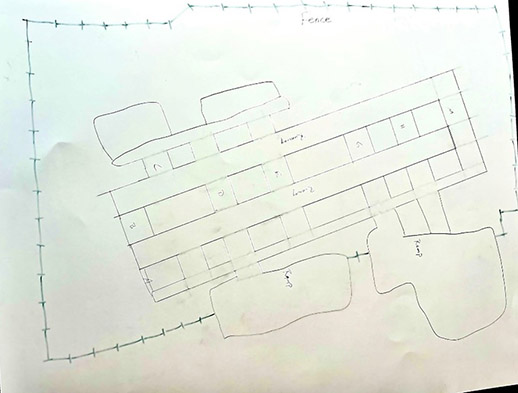
Next, update your hand-drawn Airport Layout Plan (ALP) to include:
- Obstruction
- Perimeter fence locations
- Access gates
Example:
- Runway Safety Areas (Video): Overview of RSAs and how the FAA addresses limited runway safety areas.
- Runway Safety Areas (Video): Recent FAA practices supporting runway safety improvements.
- Airport Imaginary Surfaces (Video): Diagrams and explanations of imaginary surfaces and how they apply to airport operations.
- Runway Safety “From the Flightdeck”: Pilot perspectives on runway approaches and potential hazards.
- Wildlife Management: How airports manage wildlife risks.
- Google Earth & Google Maps: Aerial imagery tools to help identify approach obstructions, fence lines, and safety areas.
And here are your wings for completing Module 2!
Finished with your Workbook and ready to move on? Next up is Module 3 – Markings, Lighting & Signs!